We are in tech because we do love technology but we should only love technology as a means to love others and help others – otherwise, our love of technology is self-centered.
Be humble
We all make mistakes and we should always be learning from them instead of being discouraged.
Always assume when others make mistakes that it was because of a lack of understanding and not because the person is incompetent or negligent.
A great software engineer is humble. We deal with complex systems and we will write bugs – we should not pretend otherwise and we should be humble enough to admit that as being humble helps new people realize that they too can become a great software engineers.
A great programmer should be doing things to reduce business and technical misunderstanding
For example, they might create diagrams, lead discussions, prefer MVPs, seek rapid feedback. If they talk more about getting good requirements or how work tickets are written, there is a good chance they do not do anything to reduce misunderstanding. They are expecting someone else to do that for them and they just want to be a ticket taker. Everyone should own helping others improve their understanding for a team to be amazing. Ticket takers by their nature take much more than they give and are not good long-term for a team to be amazing.
Code reliability is more important than readability
Code that one can trust is a super-power.
The tools to support reliability are Test-Driving-Development (TDD) and End-to-End testing or testing like a user or system would use the software. It might surprise one that unit tests do not support reliability very much as it mostly tests implementation details and not realistically how the system would be used. Same with type checking as that is also focused on an implementation detail and not reliability from a user or business perspective. (I have more on that topic but it will have to wait until another blog post).
Reliability is the greatest stress reducer and allows an engineer to have a life outside of work
Code readability is more important than efficiency or demonstrating one’s abilities
Readability is kindness to others and to your future self
Code trickiness is NOT a sign of intelligence or a great programmer – it is a sign of an unclear mind, arrogance, show-off, or someone who thinks trickiness means job security
Readability means that someone fresh from a good boot-camp or college can read the code and understand 95% of what it does and someone who has had a 101 level understanding can follow the control flow just by reading the code (understand about 80% of the code).
The only valid reason to make code tricky or less readable is to make it more reliable based on a known issue. The reliability issue NEEDs a test or a few so that others understand why the less readable path was taken.
Code reliability and code readability are more important than deadlines
Analogy: shipping an airplane on time that crashes is NOT preferred to shipping an airplane late that flies perfectly.
If a deadline is hard then you have to control scope (i.e., reduce it) so that readability and reliability are not compromised.
Values the little fixes
The little fixes for the business are usually undervalued but they always add lots of social value. For example, the search text-box on your home page once in focus for typing grows 2px wider causing the header elements to shift noticeably. This is a small fix but leaving it tells your users A) you don’t use your own software so you have noticed this problem – not a sign of trust; B) you have noticed but don’t care – also not a good sign; or C) you are too busy fixing worse issues – a sign that the software is not trustworthy.
I’ll do a follow-up in future blogs on how good senior engineers differ from when they started their journey and how team leads and software leadership differ too.
Credit for the idea to write this blog comes from Tien Vo.
These are based on reading and experience and what I will be evaluating the different approach using.
Combine without introducing bugs.
Combine with low developer mental work.
Traceability of branch life-cycle.
Traceability of how/why code was introduced.
Reduce developer workflow.
Reduce retesting.
Combining Options:
This are the 5 approaches that I am considering in this evaluation.
Merge.
Rebase then merge (fast forward).
Rebase then merge (no fast forward).
Squash then merge.
Rebase, squash, then merge.
Comparing Conflict Resolution
First evaluation, how does each approach effect conflicts between the branch and the main branch being combined?
Merge:
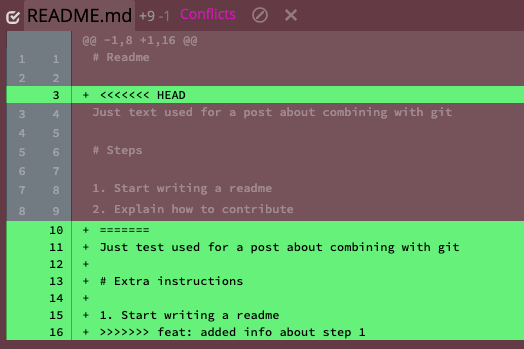
Merging means that all conflicts are resolved at once in one commit. In our example repo, the conflicts would look like the following:
It is not immediately clear in this presentation that these are the changes:
“text” vs “test”.
“Steps” vs “Extra instructions”.
There is a step 2 about contribute.
There is another step 2 about change log.
There should not be two resulting steps 2 so one will need to be changed to step 3.
The more changes presented at a time the more likely it is that a merger will make a mistake. Let us assume that humans have issues detecting changes as the number of items increases following a curve that could be modeled as n*log2(n). This means that in this case the difficulty is approximately 11.65. This topic is called change blindness if one is interested in more on the topic.
Rebase:
Rebasing means that each commit is combined one at a time. Thus, if there are 3 commits there is the possibility of 3 rebased conflict resolutions. In reality most are auto resolved, meaning that the developer doesn’t have to make any changes, but in our example each commit requires developer intervention. The first conflict presented is related to the first feature commit:
It is not immediately clear in this presentation that these are the changes:
“text” vs “test”
“Steps” vs “Extra instructions”
There is a new “step 2”
Following the same change detection difficulty equation as before means that this presentation is a 4.75. However, with rebasing the developer is not done yet and has one more presentation.
The way this is presented it is pretty clear that the feature branch has added a new step so the changes presented are:
There is an additional step
The additional step will have to become 3 (one could argue that the presentation is clearer in this case so that this is not an independent change to be detected but we will include it as the worst case).
Following the same change detection difficulty equation as before means that this presentation is a 2. Add this difficult to the first rebase means that the rebase overall difficulty was 6.75 which is a 40% less than the 11.65 difficult with merge.
Rebase was 40% easier to reason about than Merge
Comparing Resulting Git Graphs
Starting Git Graph for Example
In our example we did work on a feature branch with 2 comments and then we are going to use each approach to combine work and review the resulting git graph.
Merge
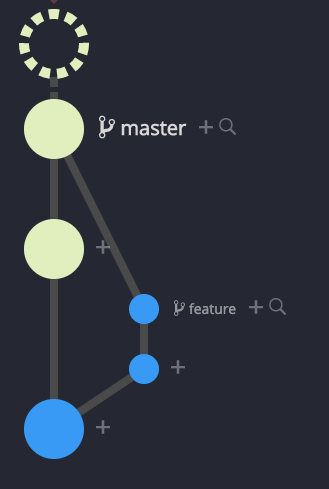
Git Graph after Merge
The resulting git graph clearly shows that the feature branch is a parent of the master or top commit. All commits are in their original places. The merge can be undone by reversing just one comment.
Rebase then merge (fast forward)
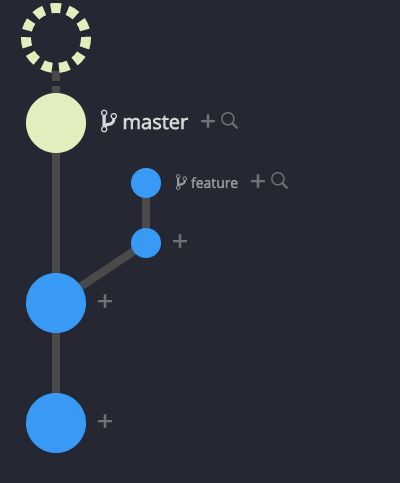
Git Graph after Rebase then Merge – Fast Forward
The resulting git graph makes it appear that there never was a feature branch and that all work was on the master branch. We build on feature branches for a reason to protect master and increase the likelihood that master is always stable and usable. This graph hides that fact – not a good attribute. Also, because master was advanced by more than one comment there are now potentially never-stable comments in master and undoing this merge is more complicated than reversing just one comment.
Rebase then merge (no fast forward)
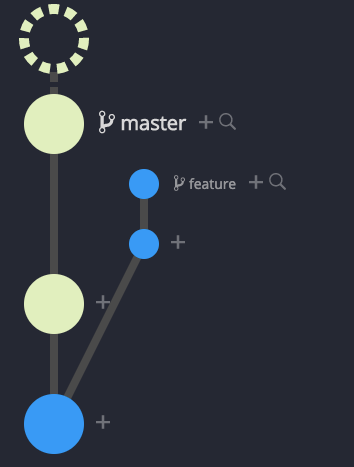
Git Graph after Rebase then Merge – No Fast Forward
The resulting git graph clearly shows that the feature branch is a parent of the master or top commit. All commits are still there but because of rebase are not in their original places. The merge can be undone by reversing just one comment.
Squash then Merge
Git Graph after Squash the Merge
The resulting git graph does not show that the feature branch is a parent of the master or top commit. This is only indicated by convention by the commit message. All feature commits are still in their original places but master has a new commit that is all work combined into one new commit. The merge can be undone by reversing just one commit.
Rebase, Squash, then Merge
Git Graph after Rebase, Squash, the Merge
The resulting git graph does not show that the feature branch is a parent of the master or top commit. This is only indicated by convention by the commit message. All feature commits are there but not in their original places because of the rebase. However, master has a new commit that is all work combined into one new commit. The merge can be undone by reversing just one commit.
Reducing Retesting
The desired case is to test the commit that once combined with master is the same code state that is put into production. Since testing starts on a feature branch before approval, if the feature branch commit is the commit state that will be in production then only that test is needed. If once combined with master the commit could be different, then a retest will be required and is more work.
The strategies of Merge and “Squash and Merge” both produce a new commit that includes code that did not exist on the feature branch during testing. Retesting is always required
The strategies of “Rebase then Merge”, “Rebase then Merge – No Fast Forward”, and “Rebase, Squash, then Merge” could be the same commit on master as on the feature branch as long as the feature branch was tested after the feature branch was rebased onto the top of master. If the rebase happens after testing, then this is a new commit that includes code that did not exist on the feature branch during testing. If testing is done after rebasing, retesting is not required.
Testing on a feature branch after rebasing is the only way to prevent retesting post combining with master.
Tracing Bugs
Sometimes when tracking down a bug it is helpful to know why a chunk of code was introduced. The clues git provides are commit message, branch names, and related files in commit. If a commit represents one small logical thought and in the commit you can see how a line was accidentally changed that signal tells you information useful to remove the bug. This is the best case. If however, the work is squashed then resulting commit many not represent a “small” thought and the messages will include more noise relative to the location of the bug. This is the least useful case. Overall, good test coverage and test cases provides much more for helping track down bugs than commit messages. So if your project has good test coverage and good test cases then commit clues are not likely to be used much. The worst the testing story the more the commit history and insight will matter.
Combining Options Summary
Summary
Bug Detection
Feature Revert
Branch Tracking
Retesting
Tracing Bugs
Merge
⭐⭐⭐
Harder
one commit
shows as parent
yes
most clues
Rebase, Merge – FF
⭐⭐⭐
Easier
many
hides as work on master
preventable
most clues
Rebase, Merge – No FF
⭐⭐⭐⭐⭐
Easier
one
shows
preventable
most clues
Squash, Merge
⭐
Harder
one
no, maybe via commit message
yes
fewer clues
Rebase, Squash, Merge
⭐⭐⭐
Easier
one
no, maybe via commit message
preventable
fewer clues
To summarize, “Rebase then Merge – No FF” for each attribute has the best outcome. The worst “Squash then Merge” has only one attribute with the best outcome and four (4) with the worst outcome.
Overall “Rebase then Merge – No Faster Forward” has the best outcomes for all attributes reviewed.
This is based on work done from 2013 to 2014 presented but not published before.
Summary
Quantifying comments made in an interview or after-action review on how important and ubiquitous a concept is perceived is still more of an art than a science. However, the Effective Comment Number (ECN) provides a metric to rank the concepts encapsulated within the various comments recorded during the after-action discussions and interviews. This metric does not specify how valid the comments are, but instead how important the underlying concept is perceived to be by the participants and how widely that concept is held.
Effective Comment Number (ECN) Equation
The context of how the ECN was invented
Scenario Based Studies
When studying a complex problem within a complex system the following is a typical setup:
Participants are placed in representational situations and executed against a scripted set of events with data recording
After scenarios are completed participants are given structure surveys (e.g., perceived workload)
At the end of all situations the participants perform an after-action report or interview style session
Other sessions are executed with different participants
Typical After-Action Report Structure
Made up of group of one or more participants
Groups do not talk with other groups – each group is an isolated, independent representation of the user population
Fixed set of starting questions that do not lead the participants
For example a good question would be: “What issues did you experience, if any, with the (subsystem) during today’s scenarios?”
A bad question would be: “What issues did you have with the (specific system element) today?”
Example Results
For illustration purposes, these are sample raw recorded comments of three after-action reports:
Day One:
Would like a cup holder
Graphical user interfaces (GUIs) are poorly layout
The chair was comfortable
Mouse was hard to use
Day Two:
Would like the GUIs to be blue-scaled
Mouse requires two hands
The mouse was really slow to use
Would prefer the background to be blue
Too much information is in the wrong places
Would like more blue colors
Day Three:
System reminds me of an old database GUI
Would like a second monitor
Chair was adjustable
Typical Example Presentation
At this point in the process, it is quite common for researchers to list all the comments in a list to present to the stakeholders:
Would like a cup holder
Graphical user interfaces (GUIs) are poorly layout
The Chair was comfortable
Mouse was hard to use
Would like the GUIs to be blue-scaled
Mouse requires two hands
The mouse was really slow to use
Would prefer the background to be blue
Too much information is in the wrong places
Would like more blue colors
System reminds me of an old database GUI
Would like a second monitor
Chair was adjustable
Slightly Better Example Presentation
A slightly better representation would be to group the comments:
GUIs
Graphical user interfaces (GUIs) are poorly layout
Too much information is in the wrong places
System reminds me of an old database GUI
Mouse
Mouse was hard to use
Mouse requires two hands
The mouse was really slow to use
Colors
Would like the GUIs to be blue-scaled
Would prefer the background to be blue
Would like more blue colors
Physical
Would like a cup holder
The Chair was comfortable
Would like a second monitor
Chair was adjustable
Problems with these types of Presentations
A group can dominate the outcome
e.g., Colors was mentioned three times but only by one group
Grouping hides whether the comments happened across all groups or just one “squeaky wheel” group
Need a way to consolidate comments and re-weight them for perceived importance across the groups
These problems are why the Effective Comment Number was created.
Effective Comment Number
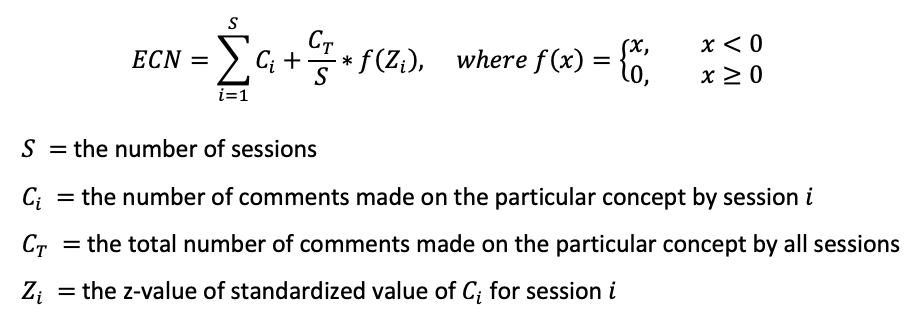
The ECN score is constructed to take into account how often a concept is discussed in one session and across all sessions and how many participants discussed that concept.
Effective Comment Number Equation
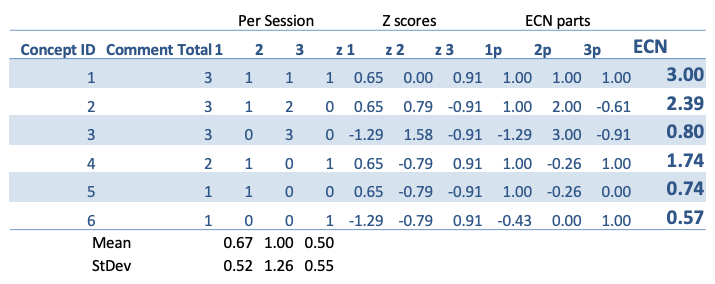
The z-value was computed in excel using functions STANDARDIZE, AVERAGE, and STDEV. The excel worksheet is provided below.
A feature of the ECN score, as defined above, is that this number can never be greater than the total number of recorded comments or less than zero. Thus, if the total number of comments relating to a concept is 12, the ECN score can only be equal to or lower than 12, but not greater. Therefore, if the comments are not evenly distributed across the sessions, the ECN score will be lower than the total number of comments represented based upon the fact that this concept is not ubiquitous. For example, concept A, with an ECN of 12, is twice as important and more widely held than concept B, with an ECN of 6.
ECN Approach
Group comments by underlying concept
Compute ECN for each concept group
Reorder concepts and present
Group Comments by Underlying Concept
The first step is to take each discretely recorded comment and group it according to the underlying concept. For example, one participant may have stated, “I think the button should be a different color, maybe blue.” Then, another participate may have stated, “I dislike the current button color, try something different.” These two comments would be grouped together as relating to the concept that the button color is disliked. One could argue that the decisions on “grouping” are still an art form, and he or she would be correct. However, if a consistent approach is taken to determine how comments are grouped together, the ECN score still provides a valid and consistent way to compare the groups and the concept’s importance and ubiquitousness.
This involves two steps
Group comments based on relating to the same underlying concept
Construct a representational group comment
For example based on the dataset provided above the following would be a good grouping with the session number in parenthesis:
The GUIs presenting information in wrong places
(1) GUIs are poorly layout
(2) Too much information is in the wrong places
(3) System reminds me of an old database GUI
The mouse was hard to use
(1) Mouse was hard to use
(2) Mouse requires two hands
(2) The mouse was really slow to use
The colors scheme would be better in blues
(2) Would like the GUIs to be blue-scaled
(2) Would prefer the background to be blue
(2) Would like more blue colors
The Chair was comfortable
(1) The Chair was comfortable
(3) Chair was adjustable
(1) Would like a cup holder
(3) Would like a second monitor
ECN Math
Using the ECN equation from above the following ECN scores were computed using excel:
Presentation based on ECN scores
Using the ECN scores to order the group comments provides the following presentation:
This provides an actionable list to stakeholders and is clearer than either of the two typical presentations above. Plus it answers the question, “How widely perceived was this comment?”
Loading styles or any resources not needed above the fold for reasonably content deliver improves page performance which in-turn improves user experience and improves SEO value.
How
This is a framework free way of loading a stylesheet after the DOM has loaded. A good example candidate is loading font-awesome stylesheet.
Sizing typography mathematically provides an eye-pleasing structure that ad-hoc does not. The modularscale site is useful at finding the right one to use. I’ve included a link with my two favorites compared — Perfect Fifth and Golden Section 😀.
Problem 3 — On mobile or small screen have a min size — is important and often overlooked. Being overlooked is why this blog posts was written and why I noticed this issue in the first place. For example the font was 0.8rem with rem being 16px. When on mobile the rem was changed to 11px so the font became 8.8px which is too small!
Problem 4 — REM is changing sizes from desktop to mobile — is one you might have in you inherit legacy styling such that if you change the base REM to stop changing based on screen size all sorts of undesired side effects happen. For example margins and layouts become too big.
// scss mixin
@mixin responsive-font-size($desktop_px, $min_px) {
  // normal situation uses rem so that a user can scale up
  font-size: $desktop_px / $root_size * 1rem;

  @media (max-width: $screen_md_min) {
    font-size: floor(($desktop_px - $min_px) * 0.8) + $min_px;
  }

  @media (max-width: $screen_sm_min) {
    font-size: floor(($desktop_px - $min_px) * 0.4) + $min_px;
  }

  @media (max-width: $screen_xs_min) {
    font-size: $min_px;
  }
}
One could add more or less steps between normal size and small screen size but the pattern is established. The trick is two fold:
font-size on desktop uses rem so that a user could via browser scale up their font sizes – solves problem 1 and 2
font-size on smaller screens uses pixels to prevent the changing rem size from causing the fonts to get too small (problem 4) and still keep the text and a good reading size (problem 3).









 Created With Flair