These are based on reading and experience and what I will be evaluating the different approach using.
Combine without introducing bugs.
Combine with low developer mental work.
Traceability of branch life-cycle.
Traceability of how/why code was introduced.
Reduce developer workflow.
Reduce retesting.
Combining Options:
This are the 5 approaches that I am considering in this evaluation.
Merge.
Rebase then merge (fast forward).
Rebase then merge (no fast forward).
Squash then merge.
Rebase, squash, then merge.
Comparing Conflict Resolution
First evaluation, how does each approach effect conflicts between the branch and the main branch being combined?
Merge:
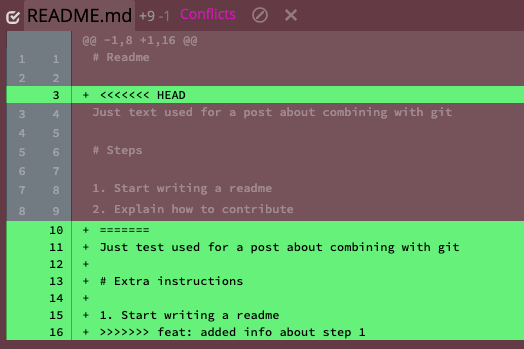
Merging means that all conflicts are resolved at once in one commit. In our example repo, the conflicts would look like the following:
It is not immediately clear in this presentation that these are the changes:
“text” vs “test”.
“Steps” vs “Extra instructions”.
There is a step 2 about contribute.
There is another step 2 about change log.
There should not be two resulting steps 2 so one will need to be changed to step 3.
The more changes presented at a time the more likely it is that a merger will make a mistake. Let us assume that humans have issues detecting changes as the number of items increases following a curve that could be modeled as n*log2(n). This means that in this case the difficulty is approximately 11.65. This topic is called change blindness if one is interested in more on the topic.
Rebase:
Rebasing means that each commit is combined one at a time. Thus, if there are 3 commits there is the possibility of 3 rebased conflict resolutions. In reality most are auto resolved, meaning that the developer doesn’t have to make any changes, but in our example each commit requires developer intervention. The first conflict presented is related to the first feature commit:
It is not immediately clear in this presentation that these are the changes:
“text” vs “test”
“Steps” vs “Extra instructions”
There is a new “step 2”
Following the same change detection difficulty equation as before means that this presentation is a 4.75. However, with rebasing the developer is not done yet and has one more presentation.
The way this is presented it is pretty clear that the feature branch has added a new step so the changes presented are:
There is an additional step
The additional step will have to become 3 (one could argue that the presentation is clearer in this case so that this is not an independent change to be detected but we will include it as the worst case).
Following the same change detection difficulty equation as before means that this presentation is a 2. Add this difficult to the first rebase means that the rebase overall difficulty was 6.75 which is a 40% less than the 11.65 difficult with merge.
Rebase was 40% easier to reason about than Merge
Comparing Resulting Git Graphs
Starting Git Graph for Example
In our example we did work on a feature branch with 2 comments and then we are going to use each approach to combine work and review the resulting git graph.
Merge
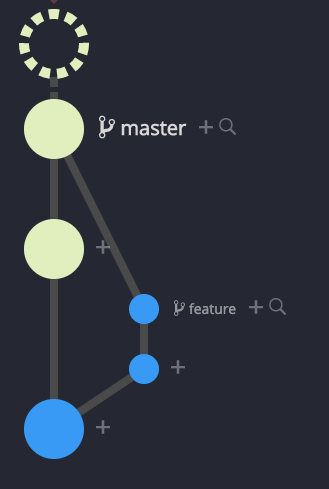
Git Graph after Merge
The resulting git graph clearly shows that the feature branch is a parent of the master or top commit. All commits are in their original places. The merge can be undone by reversing just one comment.
Rebase then merge (fast forward)
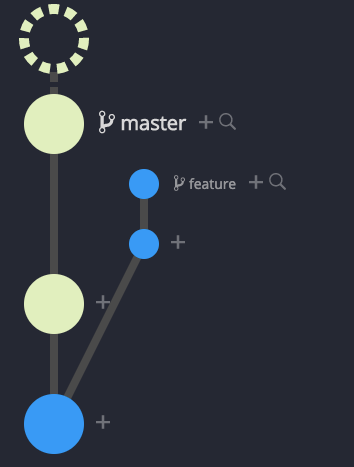
Git Graph after Rebase then Merge – Fast Forward
The resulting git graph makes it appear that there never was a feature branch and that all work was on the master branch. We build on feature branches for a reason to protect master and increase the likelihood that master is always stable and usable. This graph hides that fact – not a good attribute. Also, because master was advanced by more than one comment there are now potentially never-stable comments in master and undoing this merge is more complicated than reversing just one comment.
Rebase then merge (no fast forward)
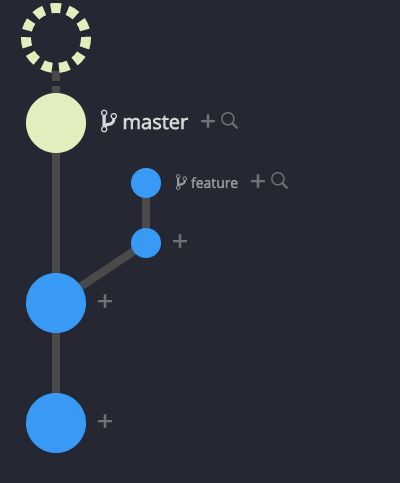
Git Graph after Rebase then Merge – No Fast Forward
The resulting git graph clearly shows that the feature branch is a parent of the master or top commit. All commits are still there but because of rebase are not in their original places. The merge can be undone by reversing just one comment.
Squash then Merge
Git Graph after Squash the Merge
The resulting git graph does not show that the feature branch is a parent of the master or top commit. This is only indicated by convention by the commit message. All feature commits are still in their original places but master has a new commit that is all work combined into one new commit. The merge can be undone by reversing just one commit.
Rebase, Squash, then Merge
Git Graph after Rebase, Squash, the Merge
The resulting git graph does not show that the feature branch is a parent of the master or top commit. This is only indicated by convention by the commit message. All feature commits are there but not in their original places because of the rebase. However, master has a new commit that is all work combined into one new commit. The merge can be undone by reversing just one commit.
Reducing Retesting
The desired case is to test the commit that once combined with master is the same code state that is put into production. Since testing starts on a feature branch before approval, if the feature branch commit is the commit state that will be in production then only that test is needed. If once combined with master the commit could be different, then a retest will be required and is more work.
The strategies of Merge and “Squash and Merge” both produce a new commit that includes code that did not exist on the feature branch during testing. Retesting is always required
The strategies of “Rebase then Merge”, “Rebase then Merge – No Fast Forward”, and “Rebase, Squash, then Merge” could be the same commit on master as on the feature branch as long as the feature branch was tested after the feature branch was rebased onto the top of master. If the rebase happens after testing, then this is a new commit that includes code that did not exist on the feature branch during testing. If testing is done after rebasing, retesting is not required.
Testing on a feature branch after rebasing is the only way to prevent retesting post combining with master.
Tracing Bugs
Sometimes when tracking down a bug it is helpful to know why a chunk of code was introduced. The clues git provides are commit message, branch names, and related files in commit. If a commit represents one small logical thought and in the commit you can see how a line was accidentally changed that signal tells you information useful to remove the bug. This is the best case. If however, the work is squashed then resulting commit many not represent a “small” thought and the messages will include more noise relative to the location of the bug. This is the least useful case. Overall, good test coverage and test cases provides much more for helping track down bugs than commit messages. So if your project has good test coverage and good test cases then commit clues are not likely to be used much. The worst the testing story the more the commit history and insight will matter.
Combining Options Summary
Summary
Bug Detection
Feature Revert
Branch Tracking
Retesting
Tracing Bugs
Merge
⭐⭐⭐
Harder
one commit
shows as parent
yes
most clues
Rebase, Merge – FF
⭐⭐⭐
Easier
many
hides as work on master
preventable
most clues
Rebase, Merge – No FF
⭐⭐⭐⭐⭐
Easier
one
shows
preventable
most clues
Squash, Merge
⭐
Harder
one
no, maybe via commit message
yes
fewer clues
Rebase, Squash, Merge
⭐⭐⭐
Easier
one
no, maybe via commit message
preventable
fewer clues
To summarize, “Rebase then Merge – No FF” for each attribute has the best outcome. The worst “Squash then Merge” has only one attribute with the best outcome and four (4) with the worst outcome.
Overall “Rebase then Merge – No Faster Forward” has the best outcomes for all attributes reviewed.






 Created With Flair